


For designers before the client review

Catch the weak spots
before your client does.

Upload a screen or landing page. Get a focused critique of what’s working, what’s unclear, and the three changes to consider next.

3 free critiques · For iPhone and iPad · No subscription needed to start

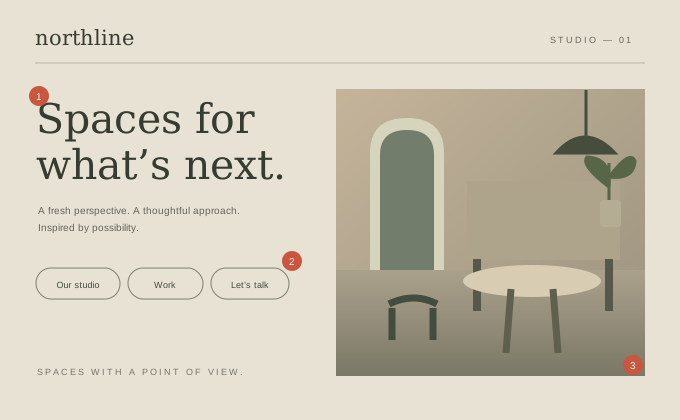
Fictional studio landing page Before
Fictional Northline studio page with a vague headline and three equally prominent navigation buttons.
01

First fix · Make the promise specific

“Spaces for what’s next” leaves the service unclear. Name the work and who it’s for.

Illustrative demo. Original fictional design and editorial feedback, not a customer result.

The useful part is what comes next

Less guessing.
Three concrete places to start.

A number alone won’t improve a design. The value is in the specific change you can consider after the critique.

Explore the full sample →
  1. 01

    Say what you do, before how it feels.

    The headline could belong to an architect, a coworking space, or a furniture brand.

    Try: “Thoughtful interiors for independent cafés.” Put the service and customer in the first line.

  2. 02

    Give the visitor one clear next step.

    Three matching buttons give the studio, portfolio, and enquiry the same priority.

    Try: Make “Discuss your café” the primary action. Keep “See our work” as a quieter link.

  3. 03

    Connect the image to a real project.

    An attractive image sets a mood, but gives no context for evaluating the work.

    Try: Add a short project caption: the type of space, what changed, and the studio’s role. Use only facts you can support.

From “something feels off” to a next step

A little context.
A more useful critique.

  1. 01

    Bring the work.

    Upload a design image, a pitch deck, or a resume from Files or Photos.

  2. 02

    Set the context.

    Tell Crit who it’s for and what it needs to achieve. The same screen can need different feedback for a different goal.

  3. 03

    Make your next move.

    Read the diagnosis, focus on three specific fixes, and export a PDF when you want to keep the feedback.

A useful first critique, on us

Start with the whole picture.

Three complete critiques to find out whether Crit fits the way you work.

Crit Free

3 complete critiques

$0

  • Overall score and five dimensions
  • Full diagnosis and all three fixes
  • PDF export and history on your device
  • No subscription needed to start
Get 3 free critiques

Crit Pro

Keep the feedback coming.

$5.99/month

  • New critiques and revision reviews
  • All three critique types
  • Full diagnosis, three fixes, and PDF export
  • 7-day trial for eligible subscribers
Explore Pro in the app

US price. Pro renews monthly unless cancelled. An eligible trial converts to a paid subscription unless cancelled at least 24 hours before it ends. Your App Store purchase screen shows your local price and eligibility. For individual use. Daily fair-use and service capacity limits apply; automated or bulk use is not supported.

Keep your judgment in the loop

A second perspective.
The decisions stay yours.

Crit uses AI to evaluate your work against its audience and goal. It can miss context, make mistakes, or disagree with your intent. Treat the score as a prompt to look closer.

Your critique history is saved on your device. Submitted content is sent to our service and AI provider to generate feedback. Read how processing and storage work before uploading confidential material.

Built by IDYeah Studio, for the moments when another pair of eyes would help.

Crit app icon

Before the next review

Give the work
another look.

Get 3 free critiques

Free download for iPhone and iPad. Optional Pro subscription.